
Klaviyo vs Mailchimp: Which Is Better for UK Small Businesses in 2026?
One is built to sell products. The other is built to be easy.
Real 2026 prices from both official pricing pages, what each one actually bills you for, UK SMS and VAT quirks, and a straight answer on which to pick.
Short answer: if you run an online shop (especially on Shopify) and email already brings in a meaningful share of sales, Klaviyo is the better tool. If you are a service business, a local shop, a charity or a small store just getting started, Mailchimp does the job for less money and less setup time. At small list sizes the two cost about the same. The gap shows up in what you can do with your customer data, not in the monthly bill.
We work with both platforms, so this isn't a sales pitch for either. Here's what you'll pay in 2026, where each is stronger, and when it's worth moving.
In this guide
- Klaviyo vs Mailchimp pricing in 2026 (UK)
- The billing difference that changes the real cost
- Features side by side
- Automations: what you can actually build
- SMS in the UK
- Deliverability
- Shopify, WooCommerce and other integrations
- Which one should you choose?
- When (and how) to switch from Mailchimp to Klaviyo
- FAQs
Klaviyo vs Mailchimp pricing in 2026 (UK)
Both companies set their prices in US dollars. Mailchimp lets UK accounts pay in pounds, converted at the exchange rate on the day of each payment. Klaviyo bills in USD.
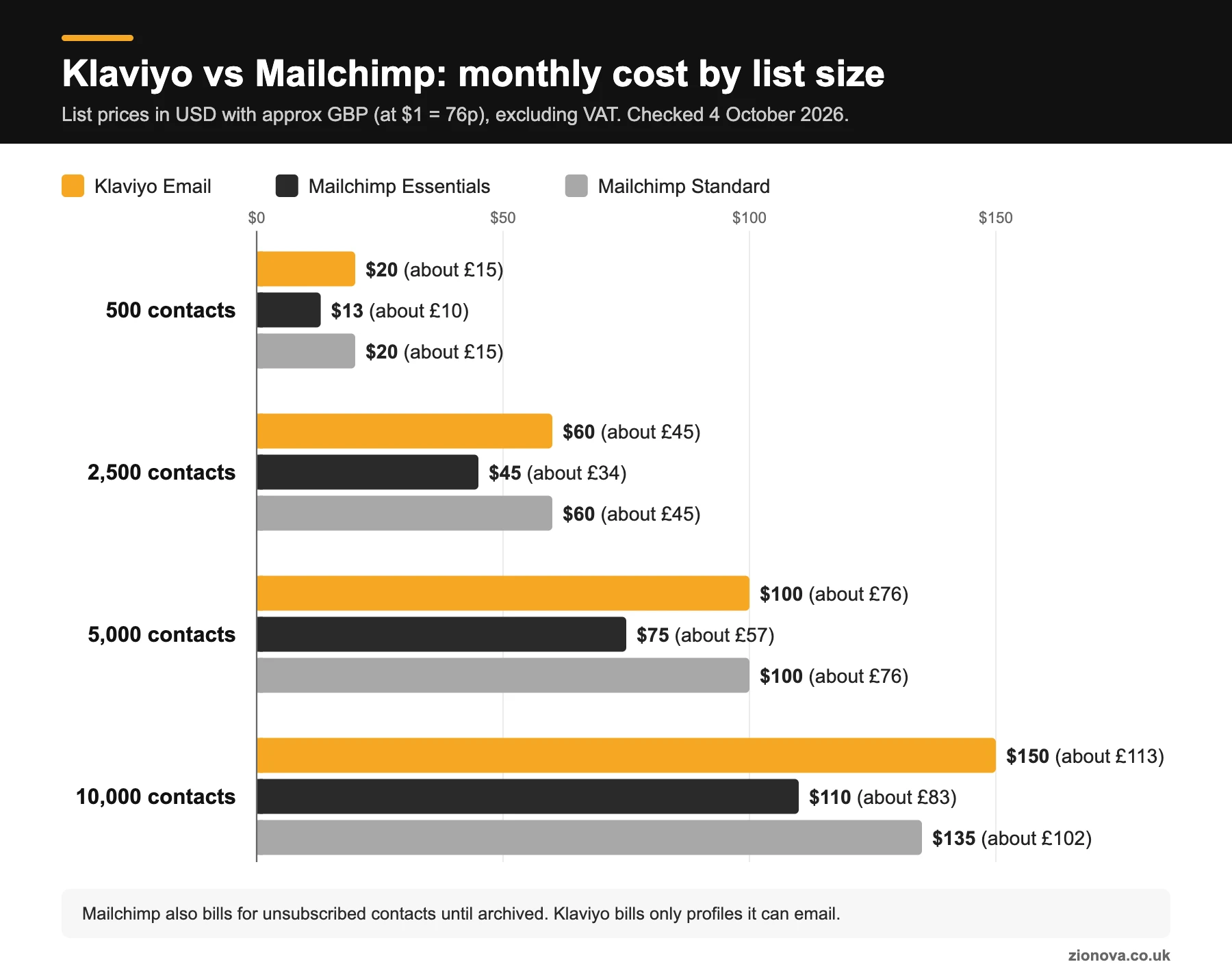
Here are the list prices for the main email plans, checked on the official pages on 4 October 2026. The pound figures are rough conversions at that day's rate (about 76p to the dollar) and exclude VAT. Treat them as typical monthly costs, not quotes.
| Contacts | Klaviyo Email | Mailchimp Essentials | Mailchimp Standard |
|---|---|---|---|
| Free plan | Up to 250 profiles, 500 emails a month, 150 SMS credits | Up to 250 contacts, 500 emails a month (250 a day) | |
| 500 | $20 (about £15) | $13 (about £10) | $20 (about £15) |
| 2,500 | $60 (about £45) | $45 (about £34) | $60 (about £45) |
| 5,000 | $100 (about £76) | $75 (about £57) | $100 (about £76) |
| 10,000 | $150 (about £113) | $110 (about £83) | $135 (about £102) |
| Monthly sends | 10x your profile tier | 10x contacts | 12x contacts |
A few things the headline numbers don't tell you:
- Mailchimp Premium starts at $350 a month (around £264) for 10,000 contacts. Most small businesses never need it.
- Mailchimp was running 15% off for 12 months on 10,000+ contacts when we checked. That's a promotion, so budget for the full price from year two.
- Overages: Mailchimp bills automatically if you go over your limits. Klaviyo lets you choose a one-off overage, an automatic upgrade, or pausing sends until renewal.
- Free plans are for testing, not running a business. Klaviyo's free plan carries Klaviyo branding in your email footers and only gets email support for the first 60 days. Mailchimp's free plan doesn't include its automation flows.
- Check the slider for your exact list size. Both pricing pages use calculators, and prices step up between the tiers shown.
What about VAT?
Both charge UK VAT unless you give them a VAT number. Klaviyo has collected UK VAT since 1 October 2024; add your number and it becomes a reverse charge you account for yourself. Mailchimp is the same: add your VAT ID and VAT comes off future invoices. Not VAT-registered? Add 20% to every figure above.
The billing difference that changes the real cost
This is the bit most comparisons skip, and it can matter more than the price list.
Mailchimp counts subscribed, non-subscribed and unsubscribed contacts towards your plan limit. If someone unsubscribes, you keep paying for them until you archive them. Archived contacts don't count towards your billing tier.
Klaviyo bills on "active profiles", meaning anyone in the account who can be emailed. Suppressed profiles (unsubscribes, hard bounces) drop out of the count once they're fully processed. The catch: that includes people added through general engagement, not just your newsletter sign-ups, so a busy store's count can run higher than expected.
For example, if you had 3,000 contacts in Mailchimp and 600 of them had unsubscribed over the years, you'd be paying for 3,000 until you archived those 600. In Klaviyo, those 600 wouldn't be billed. Both models reward regular list housekeeping, so book in a quarterly clean-up.
Our honest take on cost: under about 2,000 contacts, the difference between the two is the price of a couple of coffees a month. Don't pick on price at that size. Pick on whether you need ecommerce data driving your emails.
Features side by side
Both will send a good-looking newsletter, run a welcome series and recover abandoned baskets. The differences are in depth and data.
| Area | Klaviyo | Mailchimp |
|---|---|---|
| Built for | Ecommerce brands that want to use order and browsing data | Small businesses of all kinds, including non-ecommerce |
| Ease of use | Steeper learning curve, more settings | Quicker to learn, friendlier editor |
| Automation | Multi-step flows on all paid plans | Essentials: up to 4 flow steps. Standard and Premium: up to 200 flows |
| Predictive data | Predicted lifetime value, churn risk, expected next order date (needs enough order history) | Predictive segmentation on Standard and Premium |
| A/B testing | Included, even on the free plan | Standard and Premium only (A/B and multivariate) |
| Support | Email and chat on paid plans; free plan gets email for 60 days | 24/7 email and chat on paid plans; phone on Premium |
| SMS | Built in, separate SMS pricing | Paid add-on from Essentials up |
| Deliverability tools | Deliverability hub with inbox provider breakdowns and benchmarks | Standard campaign reports, fewer diagnostics |
One point worth knowing about Klaviyo's predictive features: they don't switch on until you have the data. Klaviyo's own help centre says you need at least 500 customers who have placed an order, at least 180 days of order history with orders in the last 30 days, and some customers who have ordered three or more times. Don't pay for Klaviyo on the strength of features you can't use yet.
Automations: what you can actually build
Automations are where email earns its keep. These are the ones worth building first:
- Welcome series for new subscribers (both platforms do this well).
- Abandoned basket reminders (both, with a store connected).
- Browse abandonment, triggered when someone views products but doesn't add to basket. This is Klaviyo's home ground.
- Post-purchase thank-you, care tips and review requests.
- Win-back for customers who haven't bought in a while.
- Back in stock and price drop alerts.
On Mailchimp Essentials, the 4 flow step limit gets tight fast. A decent welcome series with a branch for buyers and non-buyers can blow through it, pushing you onto Standard, where the price gap with Klaviyo mostly disappears.
Klaviyo's advantage is how much store data you can split on: what someone bought, how often, how much they spend and what they browsed. If you sell something people reorder (coffee, skincare, pet food), timing a reminder to their usual reorder window is exactly what Klaviyo makes easy. For help mapping out flows, our email automation service starts with exactly that.
SMS in the UK: the small print
Both can text UK numbers, but UK texting differs from the US features most reviews describe.
- UK texts cost more. Mailchimp's credit table lists a UK SMS at 5 credits. Klaviyo's older credit table did the same, against 1 credit for a US text (newer accounts see per-message rates in billing settings). An SMS allowance goes much less far here.
- No picture messages. Both list MMS as unavailable for the UK.
- Branded sender names are one-way. Sending as "YOURSHOP" looks great, but on Klaviyo a branded sender ID can't receive replies, so two-way chat and text-to-join keywords won't work. Mailchimp's UK setup also uses a branded sender ID.
- Credits don't roll over on either platform. Buy the allowance you'll actually use.
The law matters too. Under PECR, marketing emails and texts to individuals need specific consent, or the "soft opt-in" for existing customers who bought something similar, with a simple opt-out when you collected their details and in every message. Neither platform decides that for you. Our SMS marketing team can set up compliant sign-up forms and flows on either platform.
Deliverability: does one land in the inbox more?
Your own habits matter far more than the platform. What lands you in spam is mailing people who never open, bought lists, weak authentication and complaints.
Google's sender guidelines apply to anyone sending more than 5,000 messages a day to Gmail accounts: SPF, DKIM and DMARC on your domain, one-click unsubscribe, and a spam rate below 0.30% in Postmaster Tools. You need these on either platform.
Where Klaviyo is stronger is diagnosis. Its deliverability hub breaks results down by inbox provider, domain and country, shows bounce reasons and benchmarks you against peers. Mailchimp's reporting gives you less to go on when Gmail or Outlook suddenly turns on you.
If you move platforms, expect a warm-up period. Klaviyo says new accounts on a branded sending domain need to warm up their sending over the first 2 to 4 weeks. In practice that means starting with your most engaged people and building volume gradually. A full-list blast on day one is the classic migration mistake. If your open rates have already dropped, our email deliverability service is the place to start.
Shopify, WooCommerce and other integrations
Both connect to Shopify, WooCommerce, BigCommerce and hundreds of other tools.
Shopify: Klaviyo's Shopify app is built by Klaviyo and is rated 4.7 from more than 3,000 reviews when we checked. Mailchimp has an official app too (rated 4.8 from around 1,500 reviews) that syncs customers, products and orders, so the old "Mailchimp doesn't work with Shopify" line is out of date.
The real difference is depth. Klaviyo pulls in detailed store events (viewed product, started checkout, placed order, refunded) and makes each one usable in segments and flows. Mailchimp's sync covers the core flows, and links with tools like QuickBooks Online and Canva suit businesses whose email is more about news and offers.
For non-ecommerce businesses (trades, professional services, B2B) Mailchimp usually fits better: simpler, cheaper on Essentials, nothing to configure that you won't use. Our Mailchimp management clients are mostly in that camp.
Which one should you choose?
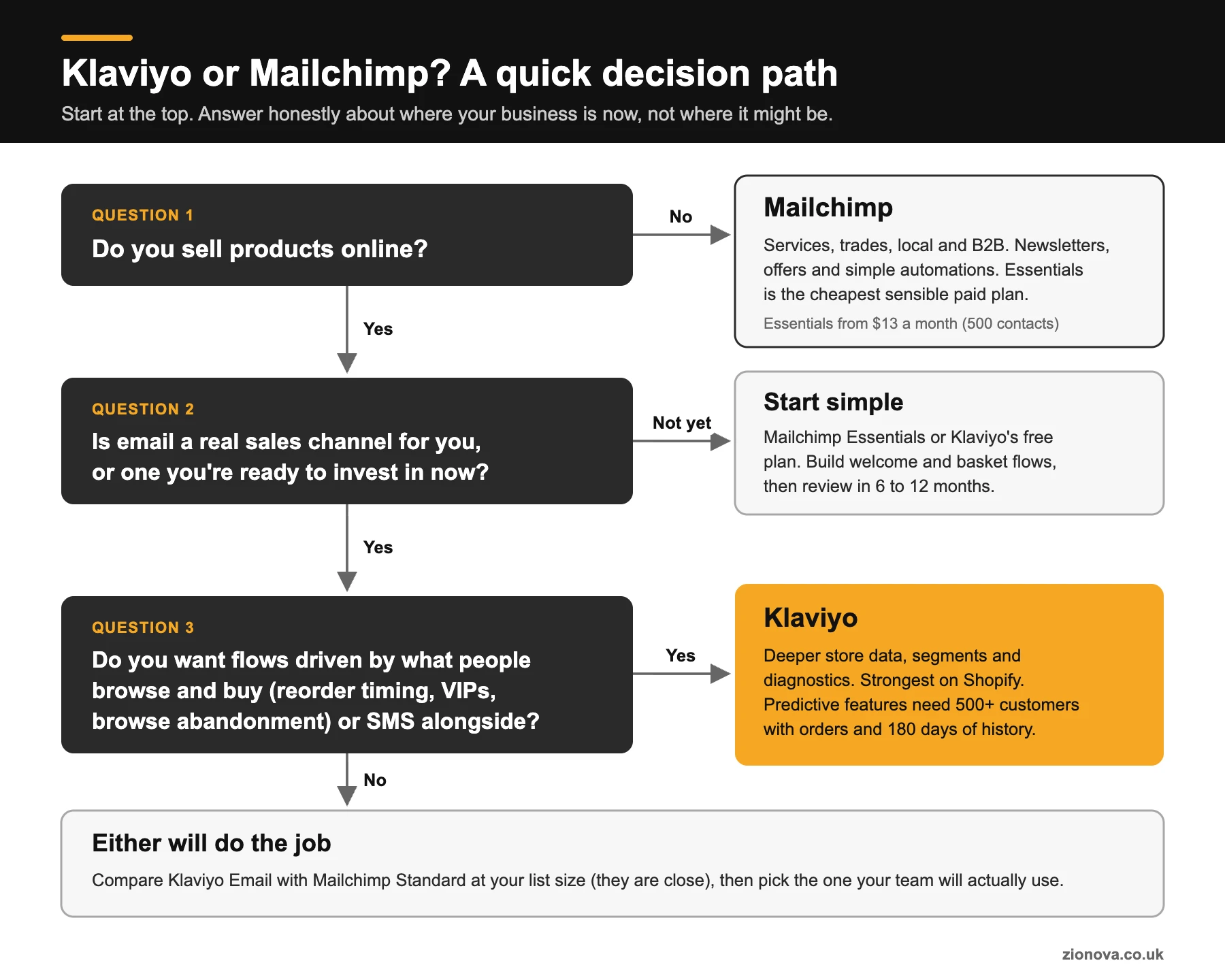
Choose Klaviyo if...
- You sell products online and email is (or should be) a serious revenue channel.
- You want flows driven by what people browse and buy, not just whether they subscribed.
- You're on Shopify and want the tightest data connection available.
- You want email and SMS in one place with shared segments.
Our Klaviyo email marketing service covers setup, flows and ongoing campaigns.
Choose Mailchimp if...
- You're a service, local or B2B business sending newsletters, offers and simple automations.
- You want the lowest monthly cost on a basic paid plan (Essentials).
- Several people will create emails and you want the easiest editor to learn.
- You run a small shop that isn't ready for Klaviyo's depth yet.
Whichever you go for, the platform only does what you set up in it. The basics in our guide to email marketing best practices for UK audiences apply to both, and a good email is wasted if it lands people on a slow, confusing page, which is where conversion rate optimisation comes in.
When (and how) to switch from Mailchimp to Klaviyo
A botched move can hurt deliverability for weeks, so don't switch just because a blog said Klaviyo is "better". Signs it's worth it:
- You've already moved to Mailchimp Standard for automations, so the cost difference is small.
- You keep wanting segments based on purchase history that Mailchimp can't build easily.
- Your shop is approaching Klaviyo's predictive thresholds (500+ customers with orders, six months of history).
- You want to add SMS and run it from the same customer data as email.
Klaviyo has a built-in Mailchimp integration that pulls across contacts, subscription status (including unsubscribes and cleaned contacts), audiences as lists, and 90 days of opens and clicks. What it won't move is your automations, sign-up forms or templates. Those need rebuilding. Custom tags need exporting and importing as CSV files.
Migration checklist
- ☐ Export everything from Mailchimp first, including unsubscribes and tags, as a backup.
- ☐ Connect your store to Klaviyo and let historical orders sync.
- ☐ Run Klaviyo's Mailchimp sync and check unsubscribed contacts arrived suppressed.
- ☐ Set up a branded sending domain with SPF, DKIM and DMARC.
- ☐ Rebuild your flows, starting with welcome and abandoned basket.
- ☐ Replace Mailchimp sign-up forms and pop-ups on your website.
- ☐ Warm up over 2 to 4 weeks, sending to your most engaged people first.
- ☐ Keep Mailchimp running for a short overlap, then archive or close it so you're not paying twice.
For a small store, plan on a few weeks, mostly rebuilding flows and warming up rather than moving data. To hand the whole move over, our ecommerce email marketing team can run it end to end.
Klaviyo vs Mailchimp: FAQs
Is Klaviyo better than Mailchimp?
For ecommerce, usually yes. Klaviyo uses store data (browsing, orders, spend) more deeply in segments and automations, and has better deliverability diagnostics. For non-ecommerce small businesses, Mailchimp is often the better fit because it's simpler and cheaper on its entry plan.
Is Klaviyo more expensive than Mailchimp?
Against Mailchimp Essentials, yes: at 5,000 contacts, Klaviyo's email plan was $100 a month against $75 when we checked in October 2026. Against Mailchimp Standard, the list prices were the same at 500, 2,500 and 5,000 contacts. Because Mailchimp also bills for unsubscribed contacts, the real gap can be smaller than it looks.
Is there a free version of Klaviyo or Mailchimp?
Both have free plans capped at 250 contacts and 500 emails a month. Klaviyo's includes Klaviyo branding and 60 days of email support. Mailchimp's free plan doesn't include its automation flows. Fine for testing, too limited for a working business.
Do unsubscribed contacts count in Mailchimp?
Yes. Mailchimp counts subscribed, non-subscribed and unsubscribed contacts towards your limit. Archive contacts you no longer need, since archived contacts don't count towards your billing tier. Klaviyo doesn't bill for suppressed profiles.
Do UK businesses pay VAT on Klaviyo and Mailchimp?
Yes, unless you're VAT-registered and add your VAT number, in which case it becomes a reverse charge you handle on your own return. Otherwise expect 20% on top. Both bill from US dollar price lists, so your sterling cost moves with the exchange rate.
Can you send SMS in the UK with Klaviyo or Mailchimp?
Yes, both support UK SMS. UK messages use more credits than US ones, MMS isn't available, and branded sender names are one-way. You need consent or a valid soft opt-in under PECR, and an opt-out in every message.
How long does it take to move from Mailchimp to Klaviyo?
The data sync takes minutes. The full move, including rebuilding flows and forms and warming up your sending over 2 to 4 weeks, typically takes a small business a few weeks.
Not sure which platform fits your business?
Tell us what you sell, how big your list is and what you're using now. We'll give you a straight recommendation, even if that's "stay where you are".
Talk to ZionovaSources (checked 4 October 2026)
- Klaviyo pricing
- Klaviyo on the Shopify App Store (plans and USD billing)
- Klaviyo: how free and paid plans differ
- Klaviyo: how billing works (active profiles)
- Klaviyo: understanding tax (UK VAT)
- Klaviyo: mobile messaging credits
- Klaviyo: where SMS is available
- Klaviyo: predictive analytics requirements
- Klaviyo: deliverability monitoring
- Klaviyo: branded sending domains and warming
- Klaviyo: migrating from Mailchimp
- Mailchimp pricing
- Mailchimp: pricing tiers and contact counting
- Mailchimp: archiving contacts
- Mailchimp: international currencies
- Mailchimp: EMEA taxes (UK VAT)
- Mailchimp: SMS credits
- Mailchimp: UK SMS setup
- Mailchimp on the Shopify App Store
- Google: email sender guidelines
- ICO: electronic mail marketing (PECR)
- EmailToolTester: Mailchimp tier prices (cross-check)
- Retainful: Klaviyo tier prices (cross-check)
- XE: USD to GBP rate used for conversions